
Learn Claude the Right Way: A Four-Level Map and Eight Prompts That Turn It into a Team of Experts
Skip the random experiments: a clear map of what to learn at each level of Claude, plus eight copy-ready prompts that make it work as your researcher, analyst, advisor, critic and tutor.
 Mulk Allah Al-Sadi8 min read
What you will get
By the end of this guide you will know exactly what to master at each level, and you will have eight carefully engineered prompts that turn Claude from a chatbot into a team of experts that reviews your decisions, analyses your files and teaches you any skill.
Most people type a short question into Claude, take the first answer, and judge the whole tool by it. The problem is not Claude but the lack of a map. As a software engineering student and full-stack developer, I treat Claude like any engineering tool: understand its levels, learn them in order, and build reusable tools for myself.
In this guide I split learning into four levels, then give you eight prompts I consider the minimum library for anyone serious about using Claude.
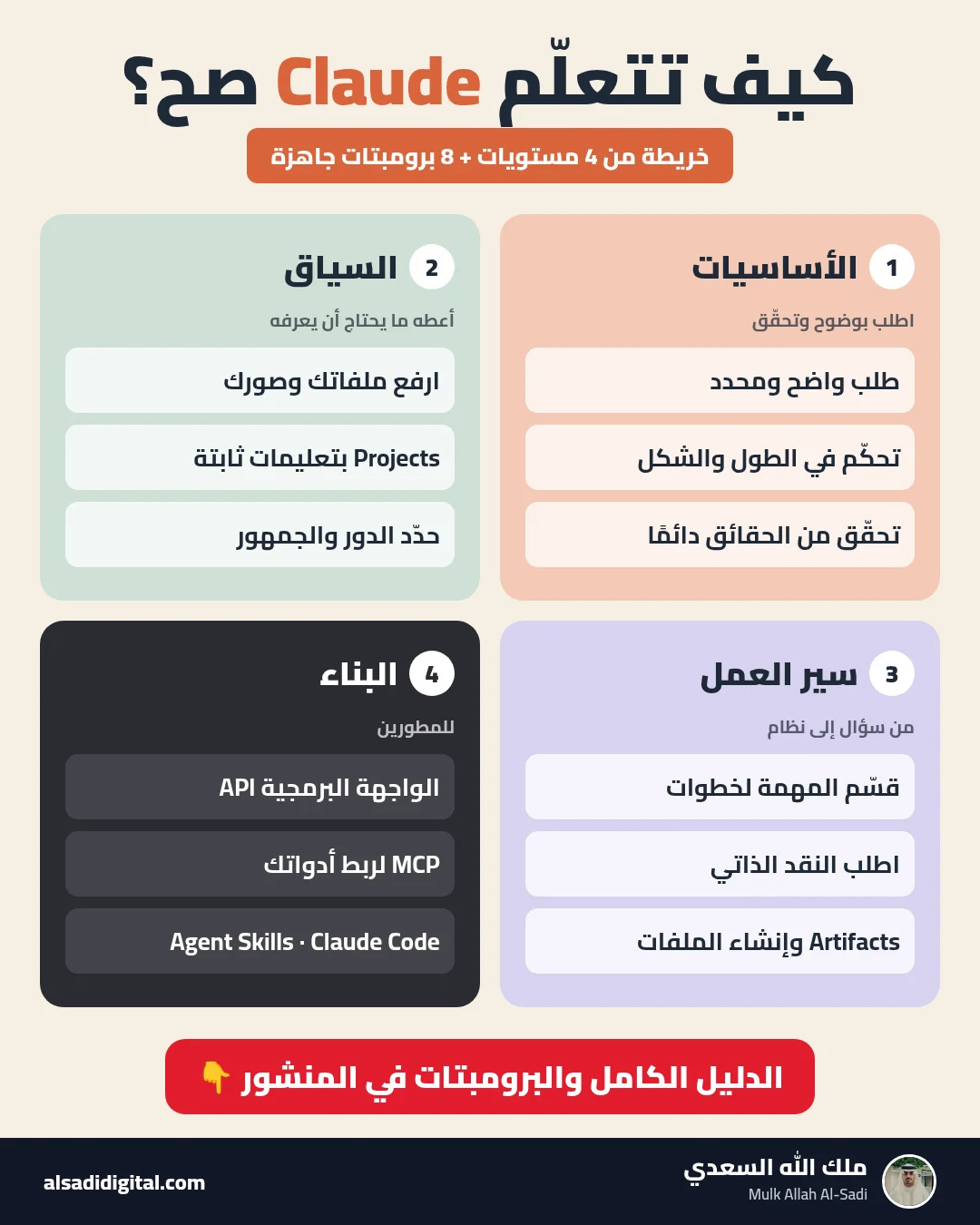
The map: four levels
- Level 1 (basics): writing a clear request, controlling length and format, and knowing Claude can get facts wrong, so you verify.
- Level 2 (context): uploading files and images, using Projects to keep standing instructions and files, and stating role, audience and criteria in every request.
- Level 3 (workflows): splitting big tasks into chained steps, asking for self-critique, using Artifacts, and creating files such as spreadsheets and documents where your plan supports it.
- Level 4 (building, for developers): the API, MCP to connect Claude to your tools, Agent Skills and Claude Code.
For an official path at each level, Anthropic’s academy at anthropic.skilljar.com offers free courses, including Claude 101 for beginners, AI Fluency: Framework & Foundations for working well with AI, and Building with the Claude API and Introduction to Model Context Protocol for developers. Many offer a certificate of completion; each course page lists the details.
Anatomy of a strong prompt
Every prompt below has five parts: role (who Claude is), context (what it must know), task (exactly what to do), constraints (what is off-limits and the criteria), and output format. Anthropic’s official docs recommend tags like <context> and <task> to separate parts of a request, because they reduce confusion between instructions and content. Replace everything in [brackets] with your details.
The eight prompts
You are running a panel of five experts: [a financial expert], [a domain expert], [a sceptic who hunts for risks], [a customer or user representative], and [an experienced career mentor].

<context>
The decision I am considering: [describe it]
My current situation: [resources, time, constraints]
What matters most to me: [priorities in order]
</context>

<task>
1. Have each expert give their view in at most 4 lines, in their own voice and priorities.
2. Show agreements and disagreements in a table.
3. Name 3 hidden assumptions behind my decision.
4. Give a conditional recommendation: "If [X], then do [Y]".
</task>

Constraints: no flattery, do not invent numbers or facts about my situation, and if important information is missing, ask me first.
When to use it: When you face an important decision (a major, a job offer, launching a project) and want more than your own view.
What to expect: Five genuinely different opinions, agreements and disagreements, then a conditional recommendation with questions you must answer. It will not decide for you, by design.
Act as a meticulous research analyst. I uploaded [number] files about [topic].

Deliver:
1. A table: for each file (aim, method, top 3 findings, limitations).
2. Patterns that appear in more than one file.
3. Contradictions between files and, where possible, why.
4. Questions none of the files answer.
5. A 6-line executive summary.

Strict rules:
- Use only the files' content, and after each point write [file name - section or page].
- If there is no evidence for something, write "not stated in the files" instead of inferring.
When to use it: After uploading several files (reports, papers, lectures) when you need what connects them, not a summary of each.
What to expect: A comparison table, recurring patterns, contradictions and gaps, each point tagged with the file and section so you can verify it.
I want to learn [concept or skill]. My current level: [beginner/intermediate]. My goal: [e.g. apply it in a project/exam].

Be a Socratic tutor:
- Ask exactly one question per message and wait for my answer.
- Start with a question that reveals what I already know.
- If I am wrong, do not give the answer; give a hint or a counter-example.
- Every 5 questions, summarise what I have mastered and what is still weak.
- Finish with one real-world practice exercise.

Start now with the first question.
When to use it: When you want to truly understand a concept, not read an explanation and forget it.
What to expect: An interactive dialogue: one question at a time, adapting to your answers, with hints and corrections instead of handing you the answer.
You are a strict reviewer specialising in [field]. Your job is to find the weaknesses before [the professor/client/recruiter] does.

Type of work: [type]. Goal: [goal]. Audience: [audience].

<work>
[paste the work here]
</work>

Deliver:
1. The 5 most serious problems (logic, evidence, clarity, structure, tone), ranked by severity.
2. For each: exactly where, why it is a problem, and a specific two-line fix.
3. Three hard questions [the audience] will ask that the work does not answer.
4. A score out of 10 with a clear reason.

Do not rewrite the work and do not open with praise.
When to use it: Before submitting research, publishing an article, sending a client proposal or applying for a job.
What to expect: A ranked list of problems from most to least serious, each with the reason and a specific fix, without rewriting the whole piece.
Act as a practical project manager.

My goal: [goal]
Deadline: [date]
Time available per week: [hours]
Skills and tools I have: [...]

Create:
1. 3 to 5 phases, each with a tangible outcome.
2. A weekly table: task, estimated time, and "how I know it is done".
3. The 3 biggest risks and a fallback for each.
4. The first task I can start today in under 30 minutes.

Keep it realistic for the time available; if the goal is unrealistic in this period, say so plainly and propose a smaller scope.
When to use it: When you have a big goal (learn a skill, build a project, prepare for an exam) and do not know where to start.
What to expect: A plan in phases and small tasks with time estimates and a definition of done for each, plus risks and a fallback.
These are my raw notes on [topic]:
<notes>
[paste your notes]
</notes>

My audience: [who]. My tone: [e.g. direct, friendly, no hype].

Turn them into:
1. A LinkedIn post (120-180 words) that opens with an attention-grabbing line without exaggeration and ends with a discussion question.
2. A numbered thread of 5 posts.
3. A 45-second video script: hook, 3 points, close.

Constraints: use only my ideas, add no numbers or experiences I did not mention, and avoid stock phrases like "in today's fast-paced world".
When to use it: When you have an idea or raw notes and want to publish on several platforms without writing each version from scratch.
What to expect: A LinkedIn post, a short thread and a short video script, all built on your ideas without new claims.
I need an analysis of [problem, data or options].

Inputs:
[paste the inputs]

Answer in this format:
- Facts: only what the inputs confirm.
- Assumptions: what you assume and why.
- Analysis: your reasoning steps, briefly.
- Conclusions: each with a confidence level (high/medium/low) and why.
- What could change the result: information that would change your view.
- The next practical step.

If the inputs are insufficient for a conclusion, say so instead of guessing.
When to use it: When you need an analysis (data, options, a work problem) and want to understand how it reached the result so you can trust it.
What to expect: A structured analysis separating facts, assumptions and conclusions, with a confidence level for each conclusion and what could change it.
You are an expert at writing prompts for language models.

This is the prompt I use:
<prompt>
[paste your prompt]
</prompt>

Its purpose: [what you want to get]
My problem with current results: [e.g. too generic, too long, invents information]

Steps:
1. Ask me up to 3 clarifying questions if needed, then stop.
2. After my answers, write an improved version with: role, context, task, constraints, output format, and variables in [brackets].
3. Explain each change in one line.
4. Suggest how to test the new prompt on two different cases.
When to use it: When you write an important prompt you will reuse, or your results are mediocre and you do not know why.
What to expect: Clarifying questions first, then an improved version of your prompt with clear parts, plus a one-line explanation of each change.
How to improve the result in your second message
The first answer is a draft. Follow-ups I use after any prompt:
- "What assumptions did you base your answer on, and which is weakest?"
- "Score your answer out of 10 against the criteria I gave, then rewrite it to reach 9."
- "Cut it in half without dropping any practical information."
- "Give me a practical example from [my field] for each point."
- "What might be wrong in your answer, and how can I check it?"
Common mistakes
- Copying a prompt without replacing the brackets, so Claude works with generic information.
- Putting everything in one huge message instead of splitting the task.
- Relying on numbers and references without checking; Claude can be confidently wrong.
- Starting a fresh chat and re-explaining every time instead of saving instructions and files in a Project.
- Uploading personal or confidential data without checking privacy and workplace policies.
Quick workflow checklist
- Identify your level and learn one skill from it this week.
- Create a Project per area you work in, with your standing instructions.
- Save the eight prompts in a file and adapt the brackets to your recurring cases.
- After every important answer, send at least one follow-up for critique and improvement.
- Verify facts and numbers before using them.
- For an official path, start with Claude 101 from Anthropic’s academy.
More articles

Stop Collecting Resource Lists: A 4-Week Roadmap to Learn AI Agents from Free Official Sources, Plus Eight Prompts to Build Your First Agent
“Top 50 resources” lists about AI agents get saved and never read. This guide picks just four free official sources, orders them into a four-week plan that ends with a small working agent, and gives you eight ready-to-copy prompts.
Mulk Allah Al-Sadi
Start Data Analytics from Zero: Cisco’s Free Data Analytics Essentials Course and Eight Prompts That Make AI Your Personal Coach
A practical guide to completing Cisco’s free data analytics course (Excel, SQL and Tableau) with real understanding, plus eight prompts for studying, practising, publishing a GitHub project and preparing for interviews.
Mulk Allah Al-Sadi
Claude for Academic Research: Eight Prompts That Turn Dozens of Papers into a Review Matrix and Clear Research Gaps
A complete research workflow with Claude: building a search strategy, dissecting each paper, building the literature matrix, finding gaps and critiquing methods, with eight precise prompts that prevent fabrication.
Mulk Allah Al-Sadi