
Just Two Hours to Get Hands-On With Claude: A Minute-by-Minute Lab With a Ready Prompt for Every Stage
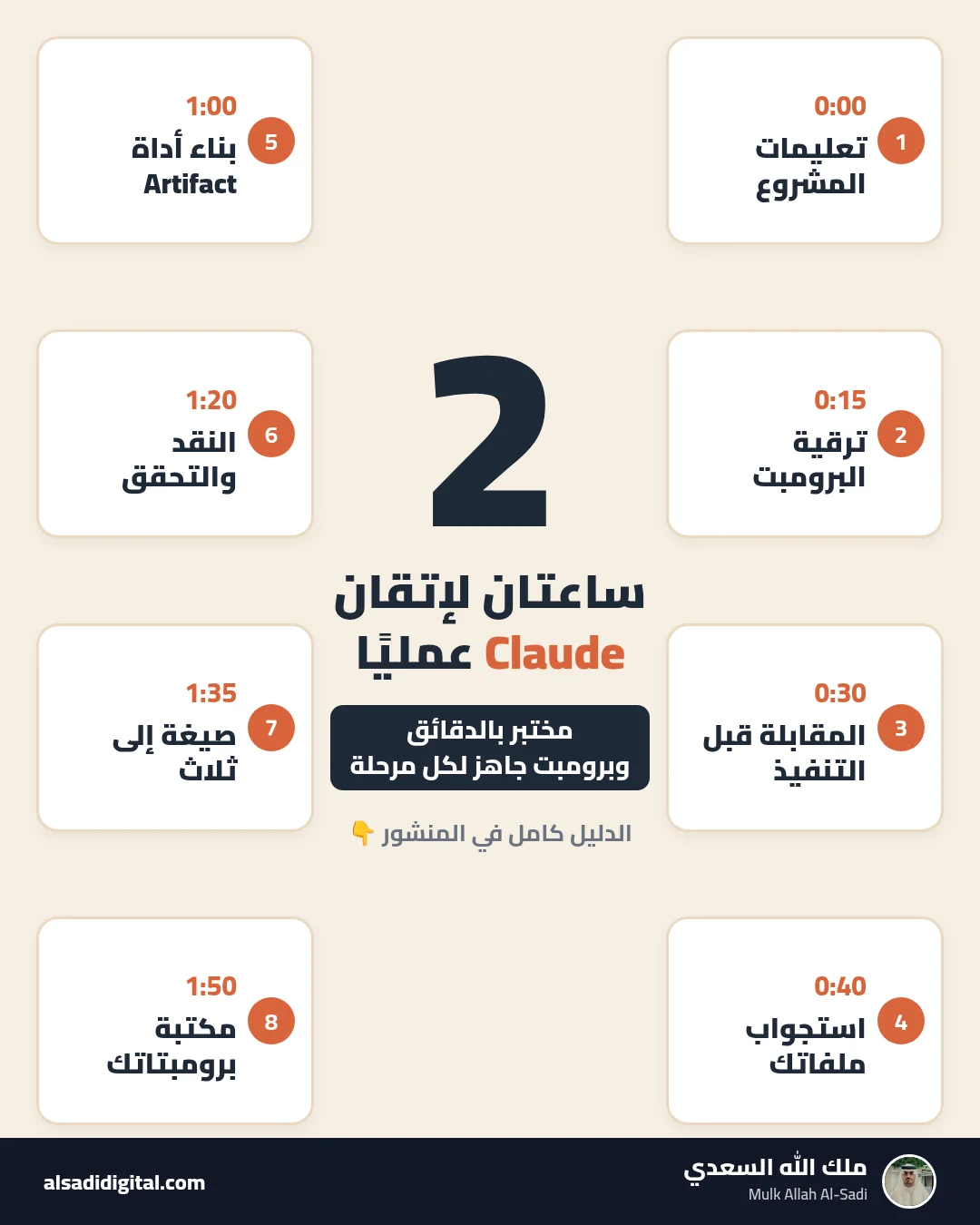
Instead of watching dozens of videos, set aside two hours for one hands-on lab: set up a project and instructions, upgrade your prompts, work with files, build an interactive tool, self-critique, and build your own prompt library. Eight ready prompts, one per stage.
 Mulk Allah Al-Sadi6 min read
What you will get
After two hours in this lab you will have a Claude project with instructions that fit you, a repeatable way to write a strong prompt, practice interrogating your files, a small interactive tool you built yourself, a habit of verifying answers, and a prompt library you reuse every day.
Most people use Claude like a search engine: a short question and a generic answer. The difference between that and professional use is not “secret tricks” but a few habits: clear context, a specific task, an output format, and review. The fastest way to build them is focused practice on a real task from your work or studies.
Before you start, pick one real task to work on for the whole lab (a report, a university project, a business plan) and prepare one or two related files. According to Claude’s pricing page, the Free plan includes Projects (up to 5), Artifacts and file uploads, with usage limits, so you can do the whole lab without a subscription.
The lab: eight stages, eight prompts
Timings are approximate; what matters is finishing each stage with a tangible output before moving on.
Help me write Project instructions for a Claude project.
About me: [role, field, level]
The task I will work on in this project: [...]
The final audience for the output: [...]
My preferred style: [concise/detailed, formal/friendly, language]
Things I dislike in answers: [e.g. long intros, hype]

Write instructions of about 150 words covering: context, priorities, the default answer format, and the rule "ask me when information is missing instead of guessing".
When to use it: Create a new Project named after your task, then use this prompt to write its instructions.
What to expect: Instruction text ready to paste into the project settings: who you are, the task, the style and the rules. After that, every chat in the project starts with the context.
This is a prompt I usually write: "[your short prompt]"

1. What information is missing for you to give your best answer? (role, context, goal, constraints, output format, examples)
2. Rewrite it with a clear structure, putting variable inputs in [brackets].
3. Briefly explain why each part improves the result.
4. Give me a 3-line short version for quick use.
When to use it: Take any short prompt you usually write and improve it.
What to expect: An analysis of what your prompt lacks, an improved version with clear structure, and the reason behind each change so you learn the rule.
I want [short description of the task].
Before you start: ask me up to 7 questions you need to do this well, one at a time, most important first.
After the questions: summarise your understanding in 5 points and wait for my confirmation, then do it.
When to use it: For vague or large tasks, instead of writing every detail yourself.
What to expect: A few focused questions before any writing, then a summary of its understanding for you to confirm, then the work.
I attached [file description]. My goal with it: [...]

<task>
1. Summarise the file in 5 points with a short supporting quote for each.
2. Answer these questions from the file only: [question 1], [question 2], [question 3].
3. For each answer: is it stated in the file or your inference?
4. Which questions important to my goal does the file not answer?
</task>
If the information is not in the file, say so clearly.
When to use it: Upload a file related to your task: a report, paper, lecture or contract.
What to expect: Answers with quotes from the file, a clear split between what is in the file and what is inference, and a list of what the file does not cover.
Create an Artifact: a simple interactive web tool that helps me with [my task], e.g. [a project task tracker / a budget calculator / review flashcards for my course].

Requirements:
- [English / Arabic right-to-left] interface, clean design that works on mobile.
- Core functions only: [2-3 functions].
- Sample data clearly labelled as sample.
Start with a simple first version, then suggest 3 improvements for me to choose from.
When to use it: To see how a plain description becomes a working tool in the browser.
What to expect: A small tool running in an Artifact window, then improved through follow-up requests. Start simple, then add features.
Review your previous answer as a strict reviewer from [target audience]:
1. What are its 3 weakest points?
2. List every claim, number or name that needs verification, and how I can verify it.
3. What did you assume that I did not tell you?
4. Rewrite it fixing the above, and put [verify] next to any unconfirmed information.
When to use it: On any important output from the lab, before you rely on it.
What to expect: A blunt review of weak points and claims that need checking, then an improved version. You still need to verify key facts yourself.
Take the final content of my task:
[paste it or refer to it in the chat]

Turn it into:
1. A 120-word email to [person] with a clear ask.
2. A comparison table or plan with columns: [define them].
3. 5 slides: each with a title stating the takeaway and 3 bullets.
Add no new information and drop no important number.
When to use it: To learn to control output format, one of the biggest time-savers.
What to expect: The same content in three ready-to-use formats, keeping the same facts.
Review this whole conversation and extract a reusable prompt library:
- 5 templates from the requests that gave the best results.
- For each: a short name, when to use it, and the text with variables in [brackets].
- Add a general template for any new task covering: role, context, task, constraints, output format.
- Arrange them in a table I can copy into my notes.
When to use it: In the final ten minutes, to save what worked and reuse it.
What to expect: Reusable templates extracted from your chat, each with a name, when to use it and bracketed variables. Save them in a notes file or the project instructions.
After the lab: keeping the skill
The lab gives you the foundation, but the skill sticks through repetition. The rule behind every stage is simple: clear context, a specific task, constraints, an output format, then review. Whenever an answer feels generic, go back to these elements and ask which one is missing.
- Use your library daily for a week, and edit templates that do not perform well.
- Create a separate project for each area (study, work, side project) with different instructions.
- Try one new feature each week: web search, file creation, or connecting your apps.
- To go deeper, take the free Claude 101 course from Anthropic Academy.
Common mistakes
- Practising on made-up examples instead of a real task you care about.
- Accepting the first answer without asking for critique and improvement.
- Building a complex Artifact in one request instead of starting simple.
- Not saving prompts that worked, so you rewrite them from scratch every time.
- Uploading sensitive files without need.
Quick workflow checklist
- Pick a real task and prepare its files.
- Project and instructions (1), upgrade a prompt (2).
- Interview first (3), interrogate files (4).
- Interactive tool (5), critique and verify (6).
- Reformat (7), prompt library (8).
- Use the library daily for a week.
More articles

Stop Collecting Resource Lists: A 4-Week Roadmap to Learn AI Agents from Free Official Sources, Plus Eight Prompts to Build Your First Agent
“Top 50 resources” lists about AI agents get saved and never read. This guide picks just four free official sources, orders them into a four-week plan that ends with a small working agent, and gives you eight ready-to-copy prompts.
Mulk Allah Al-Sadi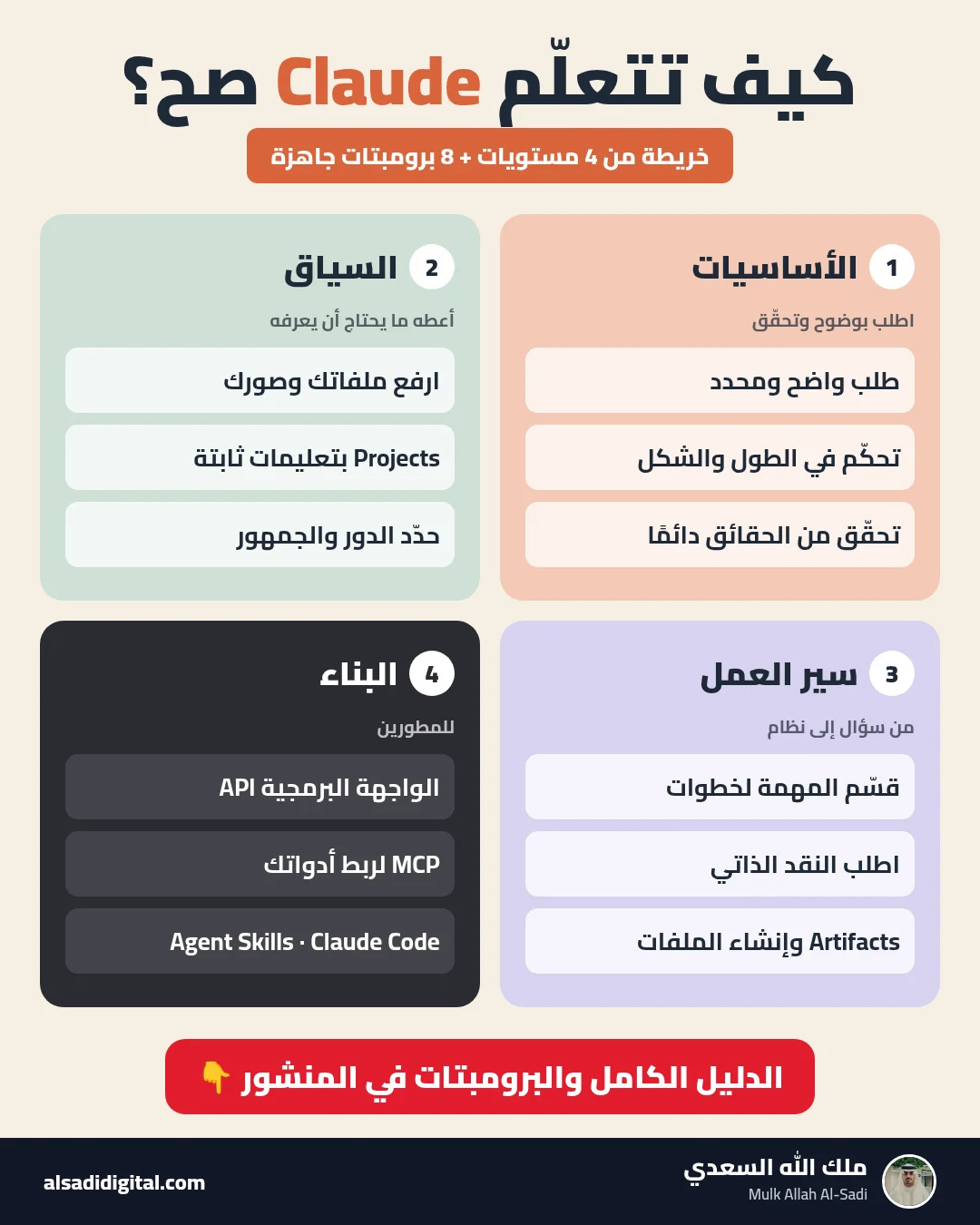
Learn Claude the Right Way: A Four-Level Map and Eight Prompts That Turn It into a Team of Experts
Skip the random experiments: a clear map of what to learn at each level of Claude, plus eight copy-ready prompts that make it work as your researcher, analyst, advisor, critic and tutor.
Mulk Allah Al-Sadi
Start Data Analytics from Zero: Cisco’s Free Data Analytics Essentials Course and Eight Prompts That Make AI Your Personal Coach
A practical guide to completing Cisco’s free data analytics course (Excel, SQL and Tableau) with real understanding, plus eight prompts for studying, practising, publishing a GitHub project and preparing for interviews.
Mulk Allah Al-Sadi